Christopher Busietta
| ||||||||||||||||
| Blog | ||||||||||||||||
|
Achtung: Diese Seit ist nicht verfügbar in Deutsch. Ich empfehle Google Translate für eine rauch Übersetzung. Blog Main Menu | About this Blog
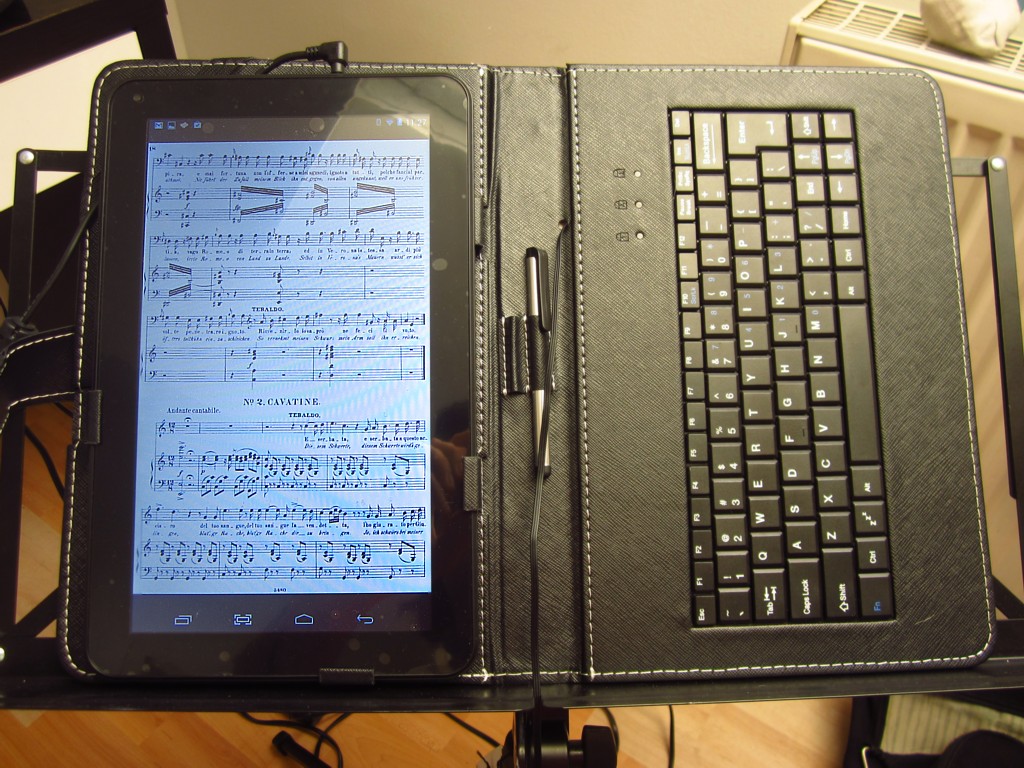
Going digital with sheet musicIn the last couple of years with the appearance of tablets, I’ve been contemplating whether it is worth spending my money on getting one.The biggest reason for me is at least professional – I would like to avoid collecting and storing more paper sheet music and also use it to learn and perform onstage without having to carry around several folders of music everywhere I go. Then, my wife made the choice for me and bought one for my birthday! After playing around with it for a few weeks I have decided that, like the MP3 player for audio recordings, the tablet is the future of sheet music in my opinion. How does it work and how practical is it? In short, there are still a few serious short-comings to be addressed, and you need to be computer-saavy to use one effectively, but ultimately it is a very useful alternative to paper music. In this blog are tips and what I see are the advantages and disadvantages.
Music Reading softwareSo you have your android tablet / iPad. Before you even copy any music onto your tablet, you must know what software you are going to use as a reader. You can read, highlight and annotate Adobe PDF scores with the android version of Adobe Reader, which is free to download. This is fine if you are reading at home, but for me it is not fast enough to use in performance or rehearsal situations. I use an app called MobileSheets, which is a faster reader optimized for music, supports complicated annotations and also catalogues your music properly. It’s not free, but is very inexpensive ($6). If there happens to be margins in a PDF for paper printing, MobileSheets (unlike Acrobat reader) has a global zoom feature that allows you to fit the music more snugly into the tablet screen for easier reading.
Adding electronic scoresThe easiest way to get sheet music is to download electronic opera scores from publishers such as CD Sheet Music or download public domain versions from somewhere such as IMSLP/Petrucci Music Library.All you have to do is download it directly from the internet onto your tablet (or transfer it from your computer) and it's ready to go! The downside is, everything is a new edition, so you can never be sure if it’s as accurate as your Ricordi or Bärenreiter opera score. Putting hard-copy printed scores into the tabletYou may not want to lose anything you have bought in hard-copy and use what you already own. The bad news is, scanning scores into your computer requires serious technical know-how and is very time consuming. Especially when compared to photocopying a score. For this reason, I would only recommend doing this for single songs and not trying to scan whole opera scores.The process for scanning a song into your tablet is as follows:
To scan and edit the sheet music, you need several pieces of software.JPEG Editing SoftwareIf you plan to scan a lot of music, I recommend using Google's Picasa to crop, edit and resize the images. It’s free, very powerful, very easy to use and most importantly it’s very quick. Using Photoshop is overkill for this sort of thing. JPEG to PDF software (Optional)Once you’ve scanned all your JPEGs and edited them, every now and then you will need to e-mail them to a pianist. Then you will need to convert them into a PDF format, which is the easiest to actually print from. I use PDFill PDF Tools, which is free software for editing PDF files. You can convert JPEG to PDF and also the reverse. This is important because PDF is the format which is easiest to print and e-mail (because it is a single file). If you have electronic scores, you can also use this tool extract arias from complete scores.
1. Scan Sheet MusicI have a HP Deskjet F2200 series all-in-one scanner/printer/photocopier. To scan one page of music at 200dpi, it takes 38 seconds – compared with the photocopier at the Augsburg Stadtbücherei (library) which takes 7 seconds to make a copy of the page.If you are on the go, you can also use a digital camera (or mobile phone) to take photographs of the score. But it's always worth using a scanner if you have the option to take the music away with you for copying. 2. Crop & edit scanned images to look good on your tablet screenOnce you scan, you will invariably need to then edit the image to make it look the best on a tablet screen. This involves converting to black and white (unless you have scanned in black and white), whitening the background (adding “brightness”) and darkening the text (adding “contrast” or “shadow”).Finally cropping out the margins from the image to make the notes as large as possible on your tablet. This takes me about 15 seconds per image in Picasa and I’m very quick. 3. Reduce size of imagesAfter you have edited all the files, you want to make sure that they are shrunk in size so they don’t take up too much hard disk space. It’s not a problem at first, but once you start getting hundreds of songs, it will be. Plus, the smaller the image, the quicker it loads in your reading software when you turn a page.Picasa has a very nice export function where you can set the size of the outputted images and then export all the images you have just scanned in one go. 4. Convert Images to PDF if necessaryOnce you have scanned, if you are intending to use Adobe Acrobat Reader instead of music-reading software such as MobileSheets, you will then have to convert all the JPG images into PDF format.This is also necessary if you plan to print out your music for any pianists (or other singers) you might work with. 5. Import music into your tabletIf you are using MobileSheets, then you can import the series of JPGs directly (as one piece) without having to convert to PDF format. The software also copies the music from the computer onto your tablet for you. I would always use the JPGs over a PDF, because they will run faster in MobileSheets.VerdictSo, as you can see, just getting your sheet music into a readable format takes some effort and technical know-how! Obviously, if you need to scan the whole of the Marriage of Figaro, you would probably need to spend ten labour intensive hours doing it if you know what you are doing.However, the advantage is, once it’s in, it will be easy to read and also print very well If you need to make copies for pianists.
Going GreenOne thing that I seriously thought about was the environmental impact of using a tablet versus using normal paper. As someone who actually wants to attempt to reduce the waste in today’s world, I decided to look into whether I could use a tablet without fuel.To my surprise, I have recently discovered there is a wealth of USB solar chargers and since I have bought one, I haven’t plugged it into the powerpoint once. There are two types you can get, a portable USB solar power bank about the size of a mobile phone. Although it takes half a day to charge, it also stores the power in a battery when you are not charging anything that day: However, if you buy one of the larger portable solar chargers (I use one made by a company called Girafus Technologies that has four large folding panels) then you can charge the tablet in three to four hours of direct sunlight. I also have USB rechargable battery packs to store extra energy on particularly sunny days, so that I can recharge my tablet on particularly cloudy days as well.
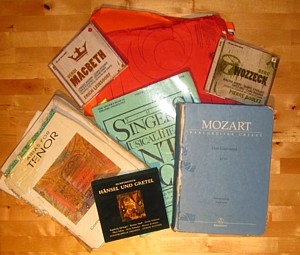
Positives of using a tablet1. You don’t have to carry lots of folders with you.In July when I actually started writing this article, I had a lot of music to learn. Here is the list in dot points.
If I had been using paper, this would mean potentially that I’d have to be choosy about which books I want to drag around with me - especially as I brought this all from Germany to Australia. It transforms having to bring several folders and thick scores to merely carrying your tablet and charger with you. I saved several kilograms in my luggage.
2. Annotations are clear, easy to erase and multi-colored.When you annotate with your tablet, you can very easily highlight in any color. Entering text is simply a matter of typing the text, selecting font and size and moving it into position. Drawing simple shapes like lines, squares and circles is also very quick and easy to do. And erasing, changing colors, font size and line thickness of every element is very easy and flexible.3. You never have to manually file or search for scores again.4. You can quickly find, download and immediately use sheet music from the internet without having to drive to the music shop.5. You can also store recordings and videos alongside your sheet music.Negatives of using a tablet1. Speed - Annotations are slower to create than with pen and paperThey may look neater, clearer and cleaner, but annotating on a tablet is not yet as instantaneous as putting pencil to paper.For example, with MobileSheets, you have to click on the screen to open the toolbar, select the right tool, select font or line width, then annotate. Each time you switch tools it takes a second to load. It’s a very short delay, but when rehearsals are running quickly and the director is talking a million miles an hour, then it becomes a problem. 2. Freehand annotations are very difficultThe biggest drawback in using the tablet is fine annotations.On one hand, some annotations are greatly improved on a tablet as mentioned above. However, actually drawing free-hand is very difficult as you have to use your fingers. Unfortunately, a tablet stylus is even more difficult to use, since the rubber points are so thick that you are never quite sure where the line is being drawn from. Even drawing a simple arrow is difficult. When, as a singer, you need to draw complex drawings like stage directions then it becomes impossible on a tablet. Similarly symbols that singers use a lot that need to be drawn, like International Phonetic Alphabet (which unfortunately are not supported on the Android keyboard) are also impossible to draw. 3. Page SizeThere isn’t currently a tablet on the market as big as an A4 piece of paper, so unfortunately, you have to deal with the small size of the notes on the page. Whether this is a problem depends on your eyes and the format of the music that you are using.4. More Page TurnsWith a tablet you only see one page at a time before you have to turn. You can get used to this, but ideally it would be nice to have double sized screen to reduce page turns.As a side note as my career as a guitarist, you can buy Bluetooth pedals that can turn pages with your feet. I have tried this and so far I have not found a way to make it reliably work when my tablet decides to go to sleep.
5. Battery power drains quicklyConstant use of a tablet while using the sheet music app will drain the power in about two hours. So you usually need a battery pack or two on hand to get through a rehearsal.6. The possibility of crashingBefore one gig, my tablet gave me a panic attack when right before a concert, instead of taking two minutes to load, it booted in about six minutes.This brings me to the point that tablets are computers and therefore can crash on you. Or run out of power. Of course, printed music is also not indestructible. It can be destroyed in your bag, coffee can be spilt on it, you can forget pages or even whole arias at home. At least in the case of digital sheet music, everything is with you all the time. So, what is missing?Here is what is missing in my opinion.
Conclusion: you still need both…In my experience so far, I think tablets are certainly very useful in concert situations. I have used it live in performance when playing my original music, in oratorio concerts and extensively in learning music in for my private recitals, concerts and operatic roles.Nothing is more luxurious than carrying a whole library with you without taking four or five books in a suitcase when you travel. However, at the moment, anything that requires lots of very quick or complex note taking and situations where you just want to throw or leave your paper scores lying around – eg. jumping in for another theatre or stage rehearsals, then it is better to have a printed score or a notebook also with you. At least, until technology catches up with a faster tablet, better software and a stylus that works like a pen... Useful links
Design and Content of this site © 2001-2012, Christopher Busietta. | Number of hits: |